Signals
Trafficity traffic lights
How phases, connections, and a protected left turn are set, and what a queue usually means.
Unofficial fan guide — not affiliated with Onramp Games.
Two panels: connections, then phases
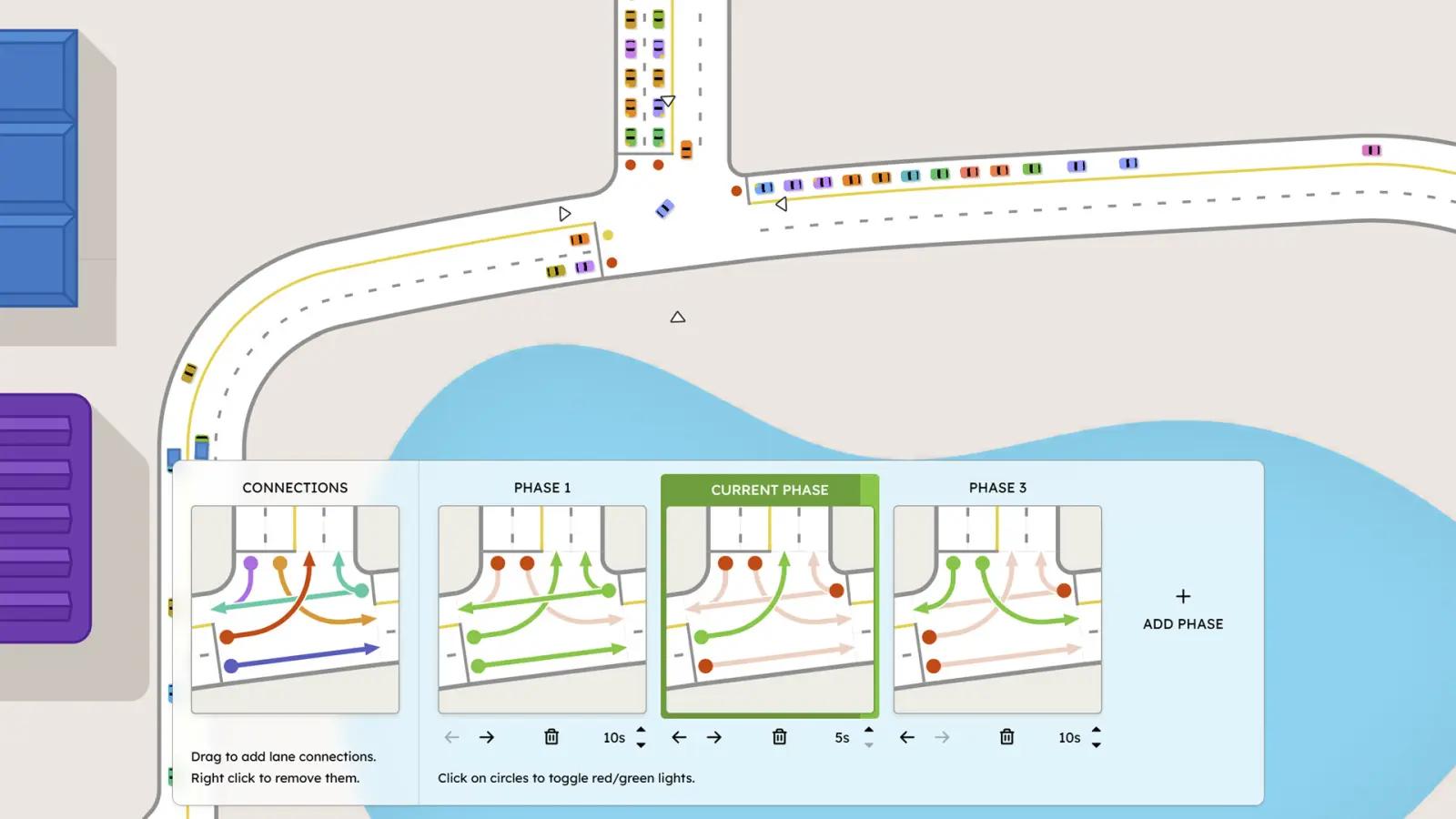
The official signal screenshot splits the editor into CONNECTIONS and PHASE. The connections column says “Drag to add lane connections. Right click to remove them.” Colored lines tie an incoming lane to an outgoing lane. If a movement is not drawn, it is not offered. That is the first place a jam hides: a turn you thought existed was never connected.
Each phase is a set of reds and greens. The footer says “Click on circles to toggle red/green lights.” The screenshot shows PHASE 1, a highlighted CURRENT PHASE, and PHASE 3, with durations of 10 seconds, 5 seconds, and 10 seconds. Arrows reorder phases. A trash icon deletes one. A button on the right reads “+ ADD PHASE.” The running order is the order of the phases. The current phase is the one painted green.
A sequence that stays inside the panel
Add a signal to the junction. The store text calls the lights fully customizable. In CONNECTIONS, drag the movements you want and right-click the ones you do not. In the first phase, click the circles so only compatible flows are green. Add another phase for the flows that conflict with the first. Set a duration on each phase — the screenshot’s own example is a longer main-road green and a shorter side-road green — and use the arrows if the order is wrong.
A protected left gets its own phase. The store text names “configure protected left turns” as a feature, and the way the panel expresses that is a phase where the left-turn circle is green and the opposing through circle is red. Do not leave the left and the opposing through on the same green if the screenshot’s own logic is “one set of circles per phase.”
After a rebuild, open the panel again. The beginner tips say junction controls can disappear when the junction is reconstructed. That applies here: a phase you liked is not guaranteed to survive a new geometry.
Limits the reviews keep hitting
Unsigned junctions cannot ban a turn by themselves. Voju and Orett’s reviews, and a Steam discussion, say the workaround is a signal that has only one phase, so the banned movement is simply never connected or never given a green. I mark that as a player technique, not as a store instruction.
The same reviews say you cannot delete a traffic light alone; you rebuild the junction. ExactChaos’s series has chapters titled around splitting phases and testing slip lanes with signals. Those are demonstrations that the panel is the tool, not a second ruleset. If a duration you want is not in the screenshot, the panel still has a duration control — I just will not publish a “best cycle” number the studio has not printed.
Questions
Can I delete one traffic light?
Reviews and discussions say a signal cannot be removed on its own. You rebuild the junction. I have no official sentence that contradicts them.
Can an unsigned junction ban a turn?
Not directly. Players use a one-phase signal as a workaround. That is a player technique, marked as such below.
Sources
- Steam store page — checked 2026-11-18
- Steam store screenshot of the signal panel — checked 2026-11-18
- Steam reviews — checked 2026-11-18
Last checked: 2026-11-18.
Related
- Beginner guide — Check the junction again after you rebuild it.
- Roundabouts — When a circle beats another phase.